ValidMind for model development 3 — Integrate custom tests

Learn how to use ValidMind for your end-to-end model documentation process with our series of four introductory notebooks. In this third notebook, supplement ValidMind tests with your own and include them as additional evidence in your documentation.

This notebook assumes that you already have a repository of custom made tests considered critical to include in your documentation. A custom test is any function that takes a set of inputs and parameters as arguments and returns one or more outputs:

For a more in-depth introduction to custom tests, refer to our Implement custom tests notebook.

Learn by doing

Our course tailor-made for developers new to ValidMind combines this series of notebooks with more a more in-depth introduction to the ValidMind Platform — Developer Fundamentals

Prerequisites

In order to integrate custom tests with your model documentation with this notebook, you'll need to first have:

Need help with the above steps?

Refer to the first two notebooks in this series:

Setting up

This section should be quite familiar to you — as we performed the same actions in the previous notebook, 2 — Start the model development process.

Initialize the ValidMind Library

As usual, let's first connect up the ValidMind Library to our model we previously registered in the ValidMind Platform:

  1. In a browser, log in to ValidMind.

  2. In the left sidebar, navigate to Inventory and select the model you registered for this "ValidMind for model development" series of notebooks.

  3. Go to Getting Started and click Copy snippet to clipboard.

Next, load your model identifier credentials from an .env file or replace the placeholder with your own code snippet:

# Make sure the ValidMind Library is installed

%pip install -q validmind

# Load your model identifier credentials from an `.env` file

%load_ext dotenv
%dotenv .env

# Or replace with your code snippet

import validmind as vm

vm.init(
    # api_host="...",
    # api_key="...",
    # api_secret="...",
    # model="...",
)
Note: you may need to restart the kernel to use updated packages.
2025-12-31 22:11:27,777 - INFO(validmind.api_client): 🎉 Connected to ValidMind!
📊 Model: [ValidMind Academy] Model development (ID: cmalgf3qi02ce199qm3rdkl46)
📁 Document Type: model_documentation

Import sample dataset

Next, we'll import the same public Bank Customer Churn Prediction dataset from Kaggle we used in the last notebook so that we have something to work with:

from validmind.datasets.classification import customer_churn as demo_dataset

print(
    f"Loaded demo dataset with: \n\n\t• Target column: '{demo_dataset.target_column}' \n\t• Class labels: {demo_dataset.class_labels}"
)

raw_df = demo_dataset.load_data()
Loaded demo dataset with: 

    • Target column: 'Exited' 
    • Class labels: {'0': 'Did not exit', '1': 'Exited'}

We'll apply a simple rebalancing technique to the dataset before continuing:

import pandas as pd

raw_copy_df = raw_df.sample(frac=1)  # Create a copy of the raw dataset

# Create a balanced dataset with the same number of exited and not exited customers
exited_df = raw_copy_df.loc[raw_copy_df["Exited"] == 1]
not_exited_df = raw_copy_df.loc[raw_copy_df["Exited"] == 0].sample(n=exited_df.shape[0])

balanced_raw_df = pd.concat([exited_df, not_exited_df])
balanced_raw_df = balanced_raw_df.sample(frac=1, random_state=42)

Remove highly correlated features

Let's also quickly remove highly correlated features from the dataset using the output from a ValidMind test.

As you learned previously, before we can run tests you'll need to initialize a ValidMind dataset object:

# Register new data and now 'balanced_raw_dataset' is the new dataset object of interest
vm_balanced_raw_dataset = vm.init_dataset(
    dataset=balanced_raw_df,
    input_id="balanced_raw_dataset",
    target_column="Exited",
)

With our balanced dataset initialized, we can then run our test and utilize the output to help us identify the features we want to remove:

# Run HighPearsonCorrelation test with our balanced dataset as input and return a result object
corr_result = vm.tests.run_test(
    test_id="validmind.data_validation.HighPearsonCorrelation",
    params={"max_threshold": 0.3},
    inputs={"dataset": vm_balanced_raw_dataset},
)

❌ High Pearson Correlation

High Pearson Correlation is designed to identify highly correlated feature pairs in a dataset, suggesting feature redundancy or multicollinearity. The primary purpose of this test is to measure the linear relationship between features, which can indicate potential issues such as feature redundancy or multicollinearity that may affect the performance and interpretability of machine learning models.

The test operates by calculating pairwise Pearson correlations for all features in the dataset. It measures the strength and direction of the linear relationship between two variables, with the correlation coefficient ranging from -1 to 1. A value close to 1 indicates a strong positive linear relationship, while a value close to -1 indicates a strong negative linear relationship. A value around 0 suggests no linear relationship. The test sorts these correlations, removes duplicates and self-correlations, and evaluates them against a pre-set threshold (0.3 by default). If the absolute value of a correlation exceeds this threshold, it is flagged as a potential issue. The test also returns the top n strongest correlations, providing a clear view of the most significant relationships in the dataset.

The primary advantages of this test include its ability to quickly and effectively identify linear relationships between feature pairs, which is crucial for understanding potential multicollinearity issues. This transparency allows developers and risk management teams to address these issues early in the model development process. The test's output is straightforward, displaying pairs of correlated variables, their Pearson correlation coefficients, and a Pass or Fail status, making it easy to interpret and act upon. This capability is particularly useful in scenarios where model performance and interpretability are critical, as it helps ensure that the model is not unduly influenced by redundant features.

It should be noted that the test is limited to detecting linear relationships and may not capture nonlinear dependencies between features. Additionally, the Pearson correlation coefficient is sensitive to outliers, which can skew results and lead to misleading conclusions. The test only identifies redundancy within feature pairs, potentially missing more complex relationships involving three or more variables. High correlation coefficients exceeding the threshold indicate a risk of multicollinearity, which can lead to model overfitting and reduced interpretability, as it becomes challenging to determine the individual predictive power of correlated features.

This test shows the results in a tabular format, where each row represents a pair of features along with their Pearson correlation coefficient and a Pass or Fail status. The table includes columns for the feature pairs, the calculated correlation coefficient, and whether the correlation exceeds the threshold of 0.3. The coefficients range from -0.0353 to 0.3326, with the highest correlation observed between "Age" and "Exited" at 0.3326, which fails the test due to exceeding the threshold. The table provides a clear view of the linear relationships between features, allowing for easy identification of potential multicollinearity issues. Notable observations include the presence of both positive and negative correlations, with most coefficients falling below the threshold, indicating a general lack of strong linear relationships among the features.

The test results reveal the following key insights:

  • Age and Exited Correlation: The pair "Age" and "Exited" shows a correlation coefficient of 0.3326, which exceeds the threshold and is marked as Fail, indicating a potential issue with multicollinearity.
  • General Low Correlations: Most feature pairs exhibit low correlation coefficients, with values ranging from -0.0353 to 0.1284, suggesting minimal linear relationships and a Pass status for these pairs.
  • Negative Correlations: Several feature pairs, such as "IsActiveMember" and "Exited" with a coefficient of -0.1905, show negative correlations, indicating inverse relationships that do not exceed the threshold.

Based on these results, the dataset exhibits generally low linear correlations among most feature pairs, with the exception of "Age" and "Exited," which shows a moderate positive correlation exceeding the threshold. This suggests that while multicollinearity is not a widespread issue in this dataset, the relationship between "Age" and "Exited" may require further investigation to ensure it does not adversely affect model performance. The presence of low correlations among other features indicates that the dataset is relatively free from linear redundancy, supporting the model's interpretability and robustness. However, attention should be given to the potential impact of the identified correlation on the model's predictive capabilities.

Parameters:

{
  "max_threshold": 0.3
}
            

Tables

Columns Coefficient Pass/Fail
(Age, Exited) 0.3326 Fail
(IsActiveMember, Exited) -0.1905 Pass
(Balance, NumOfProducts) -0.1760 Pass
(Balance, Exited) 0.1284 Pass
(NumOfProducts, Exited) -0.0535 Pass
(Tenure, IsActiveMember) -0.0480 Pass
(Tenure, EstimatedSalary) 0.0416 Pass
(Balance, HasCrCard) -0.0392 Pass
(CreditScore, EstimatedSalary) -0.0368 Pass
(Age, NumOfProducts) -0.0353 Pass
# From result object, extract table from `corr_result.tables`
features_df = corr_result.tables[0].data
features_df
Columns Coefficient Pass/Fail
0 (Age, Exited) 0.3326 Fail
1 (IsActiveMember, Exited) -0.1905 Pass
2 (Balance, NumOfProducts) -0.1760 Pass
3 (Balance, Exited) 0.1284 Pass
4 (NumOfProducts, Exited) -0.0535 Pass
5 (Tenure, IsActiveMember) -0.0480 Pass
6 (Tenure, EstimatedSalary) 0.0416 Pass
7 (Balance, HasCrCard) -0.0392 Pass
8 (CreditScore, EstimatedSalary) -0.0368 Pass
9 (Age, NumOfProducts) -0.0353 Pass
# Extract list of features that failed the test
high_correlation_features = features_df[features_df["Pass/Fail"] == "Fail"]["Columns"].tolist()
high_correlation_features
['(Age, Exited)']
# Extract feature names from the list of strings
high_correlation_features = [feature.split(",")[0].strip("()") for feature in high_correlation_features]
high_correlation_features
['Age']

We can then re-initialize the dataset with a different input_id and the highly correlated features removed and re-run the test for confirmation:

# Remove the highly correlated features from the dataset
balanced_raw_no_age_df = balanced_raw_df.drop(columns=high_correlation_features)

# Re-initialize the dataset object
vm_raw_dataset_preprocessed = vm.init_dataset(
    dataset=balanced_raw_no_age_df,
    input_id="raw_dataset_preprocessed",
    target_column="Exited",
)
# Re-run the test with the reduced feature set
corr_result = vm.tests.run_test(
    test_id="validmind.data_validation.HighPearsonCorrelation",
    params={"max_threshold": 0.3},
    inputs={"dataset": vm_raw_dataset_preprocessed},
)

✅ High Pearson Correlation

High Pearson Correlation is designed to identify highly correlated feature pairs in a dataset, suggesting feature redundancy or multicollinearity. The primary purpose of this test is to measure the linear relationship between features, which can indicate potential issues such as multicollinearity that may affect the performance and interpretability of machine learning models.

The test operates by calculating pairwise Pearson correlations for all features in the dataset. It measures the strength and direction of the linear relationship between two variables, with the correlation coefficient ranging from -1 to 1. A value of 1 indicates a perfect positive linear relationship, -1 indicates a perfect negative linear relationship, and 0 indicates no linear relationship. The test sorts these correlations, removing duplicates and self-correlations, and assigns a Pass or Fail status based on whether the absolute value of the correlation coefficient exceeds a pre-set threshold, which is 0.3 by default. The test then returns the top n strongest correlations, providing a clear view of potential multicollinearity issues.

The primary advantages of this test include its ability to quickly and effectively identify linear relationships between feature pairs, which is crucial for understanding potential multicollinearity in datasets. This transparency allows developers and risk management teams to address these issues early in the model development process, potentially improving model performance and interpretability. The test's output is straightforward, displaying pairs of correlated variables along with their correlation coefficients and Pass or Fail status, making it easy to understand and act upon.

It should be noted that this test has limitations, including its focus on linear relationships, which means it cannot detect nonlinear dependencies between features. Additionally, the Pearson correlation coefficient is sensitive to outliers, which can skew results and lead to misleading interpretations. The test is also limited to identifying redundancy within feature pairs, potentially missing more complex relationships involving three or more variables. High correlation coefficients can indicate multicollinearity, which may lead to overfitting and reduced model interpretability.

This test shows the results in a tabular format, where each row represents a pair of features, the calculated Pearson correlation coefficient, and a Pass or Fail status based on the threshold of 0.3. The table includes columns for the feature pairs, the correlation coefficient, and the Pass/Fail status. The coefficients range from -0.1905 to 0.1284, all of which are below the threshold, resulting in a Pass status for each pair. The table provides a clear view of the linear relationships between features, with no coefficients exceeding the threshold, indicating no immediate multicollinearity concerns.

The test results reveal the following key insights:

  • No High Correlations Detected: All feature pairs have correlation coefficients below the threshold of 0.3, indicating no significant linear relationships that could suggest multicollinearity.
  • Negative Correlations Predominate: The majority of the correlations are negative, with the strongest being -0.1905 between 'IsActiveMember' and 'Exited'.
  • Low Positive Correlations: The highest positive correlation is 0.1284 between 'Balance' and 'Exited', which is still below the threshold, suggesting a weak linear relationship.

Based on these results, the dataset does not exhibit any strong linear relationships between feature pairs that would indicate multicollinearity concerns. The absence of high correlation coefficients suggests that the features are relatively independent, which is beneficial for model training and interpretability. The predominance of negative correlations and the low magnitude of positive correlations further support the conclusion that multicollinearity is not a significant issue in this dataset. This analysis provides confidence in the dataset's suitability for use in machine learning models without the need for immediate feature engineering to address multicollinearity.

Parameters:

{
  "max_threshold": 0.3
}
            

Tables

Columns Coefficient Pass/Fail
(IsActiveMember, Exited) -0.1905 Pass
(Balance, NumOfProducts) -0.1760 Pass
(Balance, Exited) 0.1284 Pass
(NumOfProducts, Exited) -0.0535 Pass
(Tenure, IsActiveMember) -0.0480 Pass
(Tenure, EstimatedSalary) 0.0416 Pass
(Balance, HasCrCard) -0.0392 Pass
(CreditScore, EstimatedSalary) -0.0368 Pass
(CreditScore, Exited) -0.0328 Pass
(HasCrCard, Exited) -0.0327 Pass

Train the model

We'll then use ValidMind tests to train a simple logistic regression model on our prepared dataset:

# First encode the categorical features in our dataset with the highly correlated features removed
balanced_raw_no_age_df = pd.get_dummies(
    balanced_raw_no_age_df, columns=["Geography", "Gender"], drop_first=True
)
balanced_raw_no_age_df.head()
CreditScore Tenure Balance NumOfProducts HasCrCard IsActiveMember EstimatedSalary Exited Geography_Germany Geography_Spain Gender_Male
5584 751 1 114974.24 1 1 0 125920.54 0 False False True
4789 698 6 125427.37 2 0 0 27654.44 0 False True True
2002 638 4 148045.45 2 1 1 114722.42 0 True False True
2389 602 5 164704.38 1 0 1 180716.10 1 False False True
3127 622 9 111973.97 1 1 1 162756.29 1 True False False
# Split the processed dataset into train and test
from sklearn.model_selection import train_test_split

train_df, test_df = train_test_split(balanced_raw_no_age_df, test_size=0.20)

X_train = train_df.drop("Exited", axis=1)
y_train = train_df["Exited"]
X_test = test_df.drop("Exited", axis=1)
y_test = test_df["Exited"]
from sklearn.linear_model import LogisticRegression

# Logistic Regression grid params
log_reg_params = {
    "penalty": ["l1", "l2"],
    "C": [0.001, 0.01, 0.1, 1, 10, 100, 1000],
    "solver": ["liblinear"],
}

# Grid search for Logistic Regression
from sklearn.model_selection import GridSearchCV

grid_log_reg = GridSearchCV(LogisticRegression(), log_reg_params)
grid_log_reg.fit(X_train, y_train)

# Logistic Regression best estimator
log_reg = grid_log_reg.best_estimator_
/opt/hostedtoolcache/Python/3.11.14/x64/lib/python3.11/site-packages/sklearn/linear_model/_logistic.py:1135: FutureWarning:

'penalty' was deprecated in version 1.8 and will be removed in 1.10. To avoid this warning, leave 'penalty' set to its default value and use 'l1_ratio' or 'C' instead. Use l1_ratio=0 instead of penalty='l2', l1_ratio=1 instead of penalty='l1', and C=np.inf instead of penalty=None.

/opt/hostedtoolcache/Python/3.11.14/x64/lib/python3.11/site-packages/sklearn/linear_model/_logistic.py:1160: UserWarning:

Inconsistent values: penalty=l1 with l1_ratio=0.0. penalty is deprecated. Please use l1_ratio only.
/opt/hostedtoolcache/Python/3.11.14/x64/lib/python3.11/site-packages/sklearn/linear_model/_logistic.py:1135: FutureWarning:

'penalty' was deprecated in version 1.8 and will be removed in 1.10. To avoid this warning, leave 'penalty' set to its default value and use 'l1_ratio' or 'C' instead. Use l1_ratio=0 instead of penalty='l2', l1_ratio=1 instead of penalty='l1', and C=np.inf instead of penalty=None.

/opt/hostedtoolcache/Python/3.11.14/x64/lib/python3.11/site-packages/sklearn/linear_model/_logistic.py:1160: UserWarning:

Inconsistent values: penalty=l1 with l1_ratio=0.0. penalty is deprecated. Please use l1_ratio only.

/opt/hostedtoolcache/Python/3.11.14/x64/lib/python3.11/site-packages/sklearn/linear_model/_logistic.py:1135: FutureWarning:

'penalty' was deprecated in version 1.8 and will be removed in 1.10. To avoid this warning, leave 'penalty' set to its default value and use 'l1_ratio' or 'C' instead. Use l1_ratio=0 instead of penalty='l2', l1_ratio=1 instead of penalty='l1', and C=np.inf instead of penalty=None.

/opt/hostedtoolcache/Python/3.11.14/x64/lib/python3.11/site-packages/sklearn/linear_model/_logistic.py:1160: UserWarning:

Inconsistent values: penalty=l1 with l1_ratio=0.0. penalty is deprecated. Please use l1_ratio only.

/opt/hostedtoolcache/Python/3.11.14/x64/lib/python3.11/site-packages/sklearn/linear_model/_logistic.py:1135: FutureWarning:

'penalty' was deprecated in version 1.8 and will be removed in 1.10. To avoid this warning, leave 'penalty' set to its default value and use 'l1_ratio' or 'C' instead. Use l1_ratio=0 instead of penalty='l2', l1_ratio=1 instead of penalty='l1', and C=np.inf instead of penalty=None.

/opt/hostedtoolcache/Python/3.11.14/x64/lib/python3.11/site-packages/sklearn/linear_model/_logistic.py:1160: UserWarning:

Inconsistent values: penalty=l1 with l1_ratio=0.0. penalty is deprecated. Please use l1_ratio only.

/opt/hostedtoolcache/Python/3.11.14/x64/lib/python3.11/site-packages/sklearn/linear_model/_logistic.py:1135: FutureWarning:

'penalty' was deprecated in version 1.8 and will be removed in 1.10. To avoid this warning, leave 'penalty' set to its default value and use 'l1_ratio' or 'C' instead. Use l1_ratio=0 instead of penalty='l2', l1_ratio=1 instead of penalty='l1', and C=np.inf instead of penalty=None.

/opt/hostedtoolcache/Python/3.11.14/x64/lib/python3.11/site-packages/sklearn/linear_model/_logistic.py:1160: UserWarning:

Inconsistent values: penalty=l1 with l1_ratio=0.0. penalty is deprecated. Please use l1_ratio only.
/opt/hostedtoolcache/Python/3.11.14/x64/lib/python3.11/site-packages/sklearn/linear_model/_logistic.py:1135: FutureWarning:

'penalty' was deprecated in version 1.8 and will be removed in 1.10. To avoid this warning, leave 'penalty' set to its default value and use 'l1_ratio' or 'C' instead. Use l1_ratio=0 instead of penalty='l2', l1_ratio=1 instead of penalty='l1', and C=np.inf instead of penalty=None.

/opt/hostedtoolcache/Python/3.11.14/x64/lib/python3.11/site-packages/sklearn/linear_model/_logistic.py:1135: FutureWarning:

'penalty' was deprecated in version 1.8 and will be removed in 1.10. To avoid this warning, leave 'penalty' set to its default value and use 'l1_ratio' or 'C' instead. Use l1_ratio=0 instead of penalty='l2', l1_ratio=1 instead of penalty='l1', and C=np.inf instead of penalty=None.

/opt/hostedtoolcache/Python/3.11.14/x64/lib/python3.11/site-packages/sklearn/linear_model/_logistic.py:1135: FutureWarning:

'penalty' was deprecated in version 1.8 and will be removed in 1.10. To avoid this warning, leave 'penalty' set to its default value and use 'l1_ratio' or 'C' instead. Use l1_ratio=0 instead of penalty='l2', l1_ratio=1 instead of penalty='l1', and C=np.inf instead of penalty=None.

/opt/hostedtoolcache/Python/3.11.14/x64/lib/python3.11/site-packages/sklearn/linear_model/_logistic.py:1135: FutureWarning:

'penalty' was deprecated in version 1.8 and will be removed in 1.10. To avoid this warning, leave 'penalty' set to its default value and use 'l1_ratio' or 'C' instead. Use l1_ratio=0 instead of penalty='l2', l1_ratio=1 instead of penalty='l1', and C=np.inf instead of penalty=None.

/opt/hostedtoolcache/Python/3.11.14/x64/lib/python3.11/site-packages/sklearn/linear_model/_logistic.py:1135: FutureWarning:

'penalty' was deprecated in version 1.8 and will be removed in 1.10. To avoid this warning, leave 'penalty' set to its default value and use 'l1_ratio' or 'C' instead. Use l1_ratio=0 instead of penalty='l2', l1_ratio=1 instead of penalty='l1', and C=np.inf instead of penalty=None.

/opt/hostedtoolcache/Python/3.11.14/x64/lib/python3.11/site-packages/sklearn/linear_model/_logistic.py:1135: FutureWarning:

'penalty' was deprecated in version 1.8 and will be removed in 1.10. To avoid this warning, leave 'penalty' set to its default value and use 'l1_ratio' or 'C' instead. Use l1_ratio=0 instead of penalty='l2', l1_ratio=1 instead of penalty='l1', and C=np.inf instead of penalty=None.

/opt/hostedtoolcache/Python/3.11.14/x64/lib/python3.11/site-packages/sklearn/linear_model/_logistic.py:1160: UserWarning:

Inconsistent values: penalty=l1 with l1_ratio=0.0. penalty is deprecated. Please use l1_ratio only.

/opt/hostedtoolcache/Python/3.11.14/x64/lib/python3.11/site-packages/sklearn/linear_model/_logistic.py:1135: FutureWarning:

'penalty' was deprecated in version 1.8 and will be removed in 1.10. To avoid this warning, leave 'penalty' set to its default value and use 'l1_ratio' or 'C' instead. Use l1_ratio=0 instead of penalty='l2', l1_ratio=1 instead of penalty='l1', and C=np.inf instead of penalty=None.

/opt/hostedtoolcache/Python/3.11.14/x64/lib/python3.11/site-packages/sklearn/linear_model/_logistic.py:1160: UserWarning:

Inconsistent values: penalty=l1 with l1_ratio=0.0. penalty is deprecated. Please use l1_ratio only.

/opt/hostedtoolcache/Python/3.11.14/x64/lib/python3.11/site-packages/sklearn/linear_model/_logistic.py:1135: FutureWarning:

'penalty' was deprecated in version 1.8 and will be removed in 1.10. To avoid this warning, leave 'penalty' set to its default value and use 'l1_ratio' or 'C' instead. Use l1_ratio=0 instead of penalty='l2', l1_ratio=1 instead of penalty='l1', and C=np.inf instead of penalty=None.

/opt/hostedtoolcache/Python/3.11.14/x64/lib/python3.11/site-packages/sklearn/linear_model/_logistic.py:1160: UserWarning:

Inconsistent values: penalty=l1 with l1_ratio=0.0. penalty is deprecated. Please use l1_ratio only.

/opt/hostedtoolcache/Python/3.11.14/x64/lib/python3.11/site-packages/sklearn/linear_model/_logistic.py:1135: FutureWarning:

'penalty' was deprecated in version 1.8 and will be removed in 1.10. To avoid this warning, leave 'penalty' set to its default value and use 'l1_ratio' or 'C' instead. Use l1_ratio=0 instead of penalty='l2', l1_ratio=1 instead of penalty='l1', and C=np.inf instead of penalty=None.

/opt/hostedtoolcache/Python/3.11.14/x64/lib/python3.11/site-packages/sklearn/linear_model/_logistic.py:1160: UserWarning:

Inconsistent values: penalty=l1 with l1_ratio=0.0. penalty is deprecated. Please use l1_ratio only.

/opt/hostedtoolcache/Python/3.11.14/x64/lib/python3.11/site-packages/sklearn/linear_model/_logistic.py:1135: FutureWarning:

'penalty' was deprecated in version 1.8 and will be removed in 1.10. To avoid this warning, leave 'penalty' set to its default value and use 'l1_ratio' or 'C' instead. Use l1_ratio=0 instead of penalty='l2', l1_ratio=1 instead of penalty='l1', and C=np.inf instead of penalty=None.

/opt/hostedtoolcache/Python/3.11.14/x64/lib/python3.11/site-packages/sklearn/linear_model/_logistic.py:1160: UserWarning:

Inconsistent values: penalty=l1 with l1_ratio=0.0. penalty is deprecated. Please use l1_ratio only.

/opt/hostedtoolcache/Python/3.11.14/x64/lib/python3.11/site-packages/sklearn/linear_model/_logistic.py:1135: FutureWarning:

'penalty' was deprecated in version 1.8 and will be removed in 1.10. To avoid this warning, leave 'penalty' set to its default value and use 'l1_ratio' or 'C' instead. Use l1_ratio=0 instead of penalty='l2', l1_ratio=1 instead of penalty='l1', and C=np.inf instead of penalty=None.

/opt/hostedtoolcache/Python/3.11.14/x64/lib/python3.11/site-packages/sklearn/linear_model/_logistic.py:1135: FutureWarning:

'penalty' was deprecated in version 1.8 and will be removed in 1.10. To avoid this warning, leave 'penalty' set to its default value and use 'l1_ratio' or 'C' instead. Use l1_ratio=0 instead of penalty='l2', l1_ratio=1 instead of penalty='l1', and C=np.inf instead of penalty=None.

/opt/hostedtoolcache/Python/3.11.14/x64/lib/python3.11/site-packages/sklearn/linear_model/_logistic.py:1135: FutureWarning:

'penalty' was deprecated in version 1.8 and will be removed in 1.10. To avoid this warning, leave 'penalty' set to its default value and use 'l1_ratio' or 'C' instead. Use l1_ratio=0 instead of penalty='l2', l1_ratio=1 instead of penalty='l1', and C=np.inf instead of penalty=None.

/opt/hostedtoolcache/Python/3.11.14/x64/lib/python3.11/site-packages/sklearn/linear_model/_logistic.py:1135: FutureWarning:

'penalty' was deprecated in version 1.8 and will be removed in 1.10. To avoid this warning, leave 'penalty' set to its default value and use 'l1_ratio' or 'C' instead. Use l1_ratio=0 instead of penalty='l2', l1_ratio=1 instead of penalty='l1', and C=np.inf instead of penalty=None.

/opt/hostedtoolcache/Python/3.11.14/x64/lib/python3.11/site-packages/sklearn/linear_model/_logistic.py:1135: FutureWarning:

'penalty' was deprecated in version 1.8 and will be removed in 1.10. To avoid this warning, leave 'penalty' set to its default value and use 'l1_ratio' or 'C' instead. Use l1_ratio=0 instead of penalty='l2', l1_ratio=1 instead of penalty='l1', and C=np.inf instead of penalty=None.

/opt/hostedtoolcache/Python/3.11.14/x64/lib/python3.11/site-packages/sklearn/linear_model/_logistic.py:1135: FutureWarning:

'penalty' was deprecated in version 1.8 and will be removed in 1.10. To avoid this warning, leave 'penalty' set to its default value and use 'l1_ratio' or 'C' instead. Use l1_ratio=0 instead of penalty='l2', l1_ratio=1 instead of penalty='l1', and C=np.inf instead of penalty=None.

/opt/hostedtoolcache/Python/3.11.14/x64/lib/python3.11/site-packages/sklearn/linear_model/_logistic.py:1160: UserWarning:

Inconsistent values: penalty=l1 with l1_ratio=0.0. penalty is deprecated. Please use l1_ratio only.

/opt/hostedtoolcache/Python/3.11.14/x64/lib/python3.11/site-packages/sklearn/linear_model/_logistic.py:1135: FutureWarning:

'penalty' was deprecated in version 1.8 and will be removed in 1.10. To avoid this warning, leave 'penalty' set to its default value and use 'l1_ratio' or 'C' instead. Use l1_ratio=0 instead of penalty='l2', l1_ratio=1 instead of penalty='l1', and C=np.inf instead of penalty=None.

/opt/hostedtoolcache/Python/3.11.14/x64/lib/python3.11/site-packages/sklearn/linear_model/_logistic.py:1160: UserWarning:

Inconsistent values: penalty=l1 with l1_ratio=0.0. penalty is deprecated. Please use l1_ratio only.

/opt/hostedtoolcache/Python/3.11.14/x64/lib/python3.11/site-packages/sklearn/linear_model/_logistic.py:1135: FutureWarning:

'penalty' was deprecated in version 1.8 and will be removed in 1.10. To avoid this warning, leave 'penalty' set to its default value and use 'l1_ratio' or 'C' instead. Use l1_ratio=0 instead of penalty='l2', l1_ratio=1 instead of penalty='l1', and C=np.inf instead of penalty=None.

/opt/hostedtoolcache/Python/3.11.14/x64/lib/python3.11/site-packages/sklearn/linear_model/_logistic.py:1160: UserWarning:

Inconsistent values: penalty=l1 with l1_ratio=0.0. penalty is deprecated. Please use l1_ratio only.

/opt/hostedtoolcache/Python/3.11.14/x64/lib/python3.11/site-packages/sklearn/linear_model/_logistic.py:1135: FutureWarning:

'penalty' was deprecated in version 1.8 and will be removed in 1.10. To avoid this warning, leave 'penalty' set to its default value and use 'l1_ratio' or 'C' instead. Use l1_ratio=0 instead of penalty='l2', l1_ratio=1 instead of penalty='l1', and C=np.inf instead of penalty=None.

/opt/hostedtoolcache/Python/3.11.14/x64/lib/python3.11/site-packages/sklearn/linear_model/_logistic.py:1160: UserWarning:

Inconsistent values: penalty=l1 with l1_ratio=0.0. penalty is deprecated. Please use l1_ratio only.

/opt/hostedtoolcache/Python/3.11.14/x64/lib/python3.11/site-packages/sklearn/linear_model/_logistic.py:1135: FutureWarning:

'penalty' was deprecated in version 1.8 and will be removed in 1.10. To avoid this warning, leave 'penalty' set to its default value and use 'l1_ratio' or 'C' instead. Use l1_ratio=0 instead of penalty='l2', l1_ratio=1 instead of penalty='l1', and C=np.inf instead of penalty=None.

/opt/hostedtoolcache/Python/3.11.14/x64/lib/python3.11/site-packages/sklearn/linear_model/_logistic.py:1160: UserWarning:

Inconsistent values: penalty=l1 with l1_ratio=0.0. penalty is deprecated. Please use l1_ratio only.

/opt/hostedtoolcache/Python/3.11.14/x64/lib/python3.11/site-packages/sklearn/linear_model/_logistic.py:1135: FutureWarning:

'penalty' was deprecated in version 1.8 and will be removed in 1.10. To avoid this warning, leave 'penalty' set to its default value and use 'l1_ratio' or 'C' instead. Use l1_ratio=0 instead of penalty='l2', l1_ratio=1 instead of penalty='l1', and C=np.inf instead of penalty=None.

/opt/hostedtoolcache/Python/3.11.14/x64/lib/python3.11/site-packages/sklearn/linear_model/_logistic.py:1135: FutureWarning:

'penalty' was deprecated in version 1.8 and will be removed in 1.10. To avoid this warning, leave 'penalty' set to its default value and use 'l1_ratio' or 'C' instead. Use l1_ratio=0 instead of penalty='l2', l1_ratio=1 instead of penalty='l1', and C=np.inf instead of penalty=None.

/opt/hostedtoolcache/Python/3.11.14/x64/lib/python3.11/site-packages/sklearn/linear_model/_logistic.py:1135: FutureWarning:

'penalty' was deprecated in version 1.8 and will be removed in 1.10. To avoid this warning, leave 'penalty' set to its default value and use 'l1_ratio' or 'C' instead. Use l1_ratio=0 instead of penalty='l2', l1_ratio=1 instead of penalty='l1', and C=np.inf instead of penalty=None.

/opt/hostedtoolcache/Python/3.11.14/x64/lib/python3.11/site-packages/sklearn/linear_model/_logistic.py:1135: FutureWarning:

'penalty' was deprecated in version 1.8 and will be removed in 1.10. To avoid this warning, leave 'penalty' set to its default value and use 'l1_ratio' or 'C' instead. Use l1_ratio=0 instead of penalty='l2', l1_ratio=1 instead of penalty='l1', and C=np.inf instead of penalty=None.

/opt/hostedtoolcache/Python/3.11.14/x64/lib/python3.11/site-packages/sklearn/linear_model/_logistic.py:1135: FutureWarning:

'penalty' was deprecated in version 1.8 and will be removed in 1.10. To avoid this warning, leave 'penalty' set to its default value and use 'l1_ratio' or 'C' instead. Use l1_ratio=0 instead of penalty='l2', l1_ratio=1 instead of penalty='l1', and C=np.inf instead of penalty=None.

/opt/hostedtoolcache/Python/3.11.14/x64/lib/python3.11/site-packages/sklearn/linear_model/_logistic.py:1135: FutureWarning:

'penalty' was deprecated in version 1.8 and will be removed in 1.10. To avoid this warning, leave 'penalty' set to its default value and use 'l1_ratio' or 'C' instead. Use l1_ratio=0 instead of penalty='l2', l1_ratio=1 instead of penalty='l1', and C=np.inf instead of penalty=None.

/opt/hostedtoolcache/Python/3.11.14/x64/lib/python3.11/site-packages/sklearn/linear_model/_logistic.py:1160: UserWarning:

Inconsistent values: penalty=l1 with l1_ratio=0.0. penalty is deprecated. Please use l1_ratio only.

/opt/hostedtoolcache/Python/3.11.14/x64/lib/python3.11/site-packages/sklearn/linear_model/_logistic.py:1135: FutureWarning:

'penalty' was deprecated in version 1.8 and will be removed in 1.10. To avoid this warning, leave 'penalty' set to its default value and use 'l1_ratio' or 'C' instead. Use l1_ratio=0 instead of penalty='l2', l1_ratio=1 instead of penalty='l1', and C=np.inf instead of penalty=None.

/opt/hostedtoolcache/Python/3.11.14/x64/lib/python3.11/site-packages/sklearn/linear_model/_logistic.py:1160: UserWarning:

Inconsistent values: penalty=l1 with l1_ratio=0.0. penalty is deprecated. Please use l1_ratio only.

/opt/hostedtoolcache/Python/3.11.14/x64/lib/python3.11/site-packages/sklearn/linear_model/_logistic.py:1135: FutureWarning:

'penalty' was deprecated in version 1.8 and will be removed in 1.10. To avoid this warning, leave 'penalty' set to its default value and use 'l1_ratio' or 'C' instead. Use l1_ratio=0 instead of penalty='l2', l1_ratio=1 instead of penalty='l1', and C=np.inf instead of penalty=None.

/opt/hostedtoolcache/Python/3.11.14/x64/lib/python3.11/site-packages/sklearn/linear_model/_logistic.py:1160: UserWarning:

Inconsistent values: penalty=l1 with l1_ratio=0.0. penalty is deprecated. Please use l1_ratio only.

/opt/hostedtoolcache/Python/3.11.14/x64/lib/python3.11/site-packages/sklearn/linear_model/_logistic.py:1135: FutureWarning:

'penalty' was deprecated in version 1.8 and will be removed in 1.10. To avoid this warning, leave 'penalty' set to its default value and use 'l1_ratio' or 'C' instead. Use l1_ratio=0 instead of penalty='l2', l1_ratio=1 instead of penalty='l1', and C=np.inf instead of penalty=None.

/opt/hostedtoolcache/Python/3.11.14/x64/lib/python3.11/site-packages/sklearn/linear_model/_logistic.py:1160: UserWarning:

Inconsistent values: penalty=l1 with l1_ratio=0.0. penalty is deprecated. Please use l1_ratio only.

/opt/hostedtoolcache/Python/3.11.14/x64/lib/python3.11/site-packages/sklearn/linear_model/_logistic.py:1135: FutureWarning:

'penalty' was deprecated in version 1.8 and will be removed in 1.10. To avoid this warning, leave 'penalty' set to its default value and use 'l1_ratio' or 'C' instead. Use l1_ratio=0 instead of penalty='l2', l1_ratio=1 instead of penalty='l1', and C=np.inf instead of penalty=None.

/opt/hostedtoolcache/Python/3.11.14/x64/lib/python3.11/site-packages/sklearn/linear_model/_logistic.py:1160: UserWarning:

Inconsistent values: penalty=l1 with l1_ratio=0.0. penalty is deprecated. Please use l1_ratio only.

/opt/hostedtoolcache/Python/3.11.14/x64/lib/python3.11/site-packages/sklearn/linear_model/_logistic.py:1135: FutureWarning:

'penalty' was deprecated in version 1.8 and will be removed in 1.10. To avoid this warning, leave 'penalty' set to its default value and use 'l1_ratio' or 'C' instead. Use l1_ratio=0 instead of penalty='l2', l1_ratio=1 instead of penalty='l1', and C=np.inf instead of penalty=None.

/opt/hostedtoolcache/Python/3.11.14/x64/lib/python3.11/site-packages/sklearn/linear_model/_logistic.py:1135: FutureWarning:

'penalty' was deprecated in version 1.8 and will be removed in 1.10. To avoid this warning, leave 'penalty' set to its default value and use 'l1_ratio' or 'C' instead. Use l1_ratio=0 instead of penalty='l2', l1_ratio=1 instead of penalty='l1', and C=np.inf instead of penalty=None.

/opt/hostedtoolcache/Python/3.11.14/x64/lib/python3.11/site-packages/sklearn/linear_model/_logistic.py:1135: FutureWarning:

'penalty' was deprecated in version 1.8 and will be removed in 1.10. To avoid this warning, leave 'penalty' set to its default value and use 'l1_ratio' or 'C' instead. Use l1_ratio=0 instead of penalty='l2', l1_ratio=1 instead of penalty='l1', and C=np.inf instead of penalty=None.

/opt/hostedtoolcache/Python/3.11.14/x64/lib/python3.11/site-packages/sklearn/linear_model/_logistic.py:1135: FutureWarning:

'penalty' was deprecated in version 1.8 and will be removed in 1.10. To avoid this warning, leave 'penalty' set to its default value and use 'l1_ratio' or 'C' instead. Use l1_ratio=0 instead of penalty='l2', l1_ratio=1 instead of penalty='l1', and C=np.inf instead of penalty=None.

/opt/hostedtoolcache/Python/3.11.14/x64/lib/python3.11/site-packages/sklearn/linear_model/_logistic.py:1135: FutureWarning:

'penalty' was deprecated in version 1.8 and will be removed in 1.10. To avoid this warning, leave 'penalty' set to its default value and use 'l1_ratio' or 'C' instead. Use l1_ratio=0 instead of penalty='l2', l1_ratio=1 instead of penalty='l1', and C=np.inf instead of penalty=None.

/opt/hostedtoolcache/Python/3.11.14/x64/lib/python3.11/site-packages/sklearn/linear_model/_logistic.py:1135: FutureWarning:

'penalty' was deprecated in version 1.8 and will be removed in 1.10. To avoid this warning, leave 'penalty' set to its default value and use 'l1_ratio' or 'C' instead. Use l1_ratio=0 instead of penalty='l2', l1_ratio=1 instead of penalty='l1', and C=np.inf instead of penalty=None.

/opt/hostedtoolcache/Python/3.11.14/x64/lib/python3.11/site-packages/sklearn/linear_model/_logistic.py:1160: UserWarning:

Inconsistent values: penalty=l1 with l1_ratio=0.0. penalty is deprecated. Please use l1_ratio only.

/opt/hostedtoolcache/Python/3.11.14/x64/lib/python3.11/site-packages/sklearn/linear_model/_logistic.py:1135: FutureWarning:

'penalty' was deprecated in version 1.8 and will be removed in 1.10. To avoid this warning, leave 'penalty' set to its default value and use 'l1_ratio' or 'C' instead. Use l1_ratio=0 instead of penalty='l2', l1_ratio=1 instead of penalty='l1', and C=np.inf instead of penalty=None.

/opt/hostedtoolcache/Python/3.11.14/x64/lib/python3.11/site-packages/sklearn/linear_model/_logistic.py:1160: UserWarning:

Inconsistent values: penalty=l1 with l1_ratio=0.0. penalty is deprecated. Please use l1_ratio only.

/opt/hostedtoolcache/Python/3.11.14/x64/lib/python3.11/site-packages/sklearn/linear_model/_logistic.py:1135: FutureWarning:

'penalty' was deprecated in version 1.8 and will be removed in 1.10. To avoid this warning, leave 'penalty' set to its default value and use 'l1_ratio' or 'C' instead. Use l1_ratio=0 instead of penalty='l2', l1_ratio=1 instead of penalty='l1', and C=np.inf instead of penalty=None.

/opt/hostedtoolcache/Python/3.11.14/x64/lib/python3.11/site-packages/sklearn/linear_model/_logistic.py:1160: UserWarning:

Inconsistent values: penalty=l1 with l1_ratio=0.0. penalty is deprecated. Please use l1_ratio only.

/opt/hostedtoolcache/Python/3.11.14/x64/lib/python3.11/site-packages/sklearn/linear_model/_logistic.py:1135: FutureWarning:

'penalty' was deprecated in version 1.8 and will be removed in 1.10. To avoid this warning, leave 'penalty' set to its default value and use 'l1_ratio' or 'C' instead. Use l1_ratio=0 instead of penalty='l2', l1_ratio=1 instead of penalty='l1', and C=np.inf instead of penalty=None.

/opt/hostedtoolcache/Python/3.11.14/x64/lib/python3.11/site-packages/sklearn/linear_model/_logistic.py:1160: UserWarning:

Inconsistent values: penalty=l1 with l1_ratio=0.0. penalty is deprecated. Please use l1_ratio only.

/opt/hostedtoolcache/Python/3.11.14/x64/lib/python3.11/site-packages/sklearn/linear_model/_logistic.py:1135: FutureWarning:

'penalty' was deprecated in version 1.8 and will be removed in 1.10. To avoid this warning, leave 'penalty' set to its default value and use 'l1_ratio' or 'C' instead. Use l1_ratio=0 instead of penalty='l2', l1_ratio=1 instead of penalty='l1', and C=np.inf instead of penalty=None.

/opt/hostedtoolcache/Python/3.11.14/x64/lib/python3.11/site-packages/sklearn/linear_model/_logistic.py:1160: UserWarning:

Inconsistent values: penalty=l1 with l1_ratio=0.0. penalty is deprecated. Please use l1_ratio only.

/opt/hostedtoolcache/Python/3.11.14/x64/lib/python3.11/site-packages/sklearn/linear_model/_logistic.py:1135: FutureWarning:

'penalty' was deprecated in version 1.8 and will be removed in 1.10. To avoid this warning, leave 'penalty' set to its default value and use 'l1_ratio' or 'C' instead. Use l1_ratio=0 instead of penalty='l2', l1_ratio=1 instead of penalty='l1', and C=np.inf instead of penalty=None.

/opt/hostedtoolcache/Python/3.11.14/x64/lib/python3.11/site-packages/sklearn/linear_model/_logistic.py:1135: FutureWarning:

'penalty' was deprecated in version 1.8 and will be removed in 1.10. To avoid this warning, leave 'penalty' set to its default value and use 'l1_ratio' or 'C' instead. Use l1_ratio=0 instead of penalty='l2', l1_ratio=1 instead of penalty='l1', and C=np.inf instead of penalty=None.

/opt/hostedtoolcache/Python/3.11.14/x64/lib/python3.11/site-packages/sklearn/linear_model/_logistic.py:1135: FutureWarning:

'penalty' was deprecated in version 1.8 and will be removed in 1.10. To avoid this warning, leave 'penalty' set to its default value and use 'l1_ratio' or 'C' instead. Use l1_ratio=0 instead of penalty='l2', l1_ratio=1 instead of penalty='l1', and C=np.inf instead of penalty=None.

/opt/hostedtoolcache/Python/3.11.14/x64/lib/python3.11/site-packages/sklearn/linear_model/_logistic.py:1135: FutureWarning:

'penalty' was deprecated in version 1.8 and will be removed in 1.10. To avoid this warning, leave 'penalty' set to its default value and use 'l1_ratio' or 'C' instead. Use l1_ratio=0 instead of penalty='l2', l1_ratio=1 instead of penalty='l1', and C=np.inf instead of penalty=None.

/opt/hostedtoolcache/Python/3.11.14/x64/lib/python3.11/site-packages/sklearn/linear_model/_logistic.py:1135: FutureWarning:

'penalty' was deprecated in version 1.8 and will be removed in 1.10. To avoid this warning, leave 'penalty' set to its default value and use 'l1_ratio' or 'C' instead. Use l1_ratio=0 instead of penalty='l2', l1_ratio=1 instead of penalty='l1', and C=np.inf instead of penalty=None.

/opt/hostedtoolcache/Python/3.11.14/x64/lib/python3.11/site-packages/sklearn/linear_model/_logistic.py:1135: FutureWarning:

'penalty' was deprecated in version 1.8 and will be removed in 1.10. To avoid this warning, leave 'penalty' set to its default value and use 'l1_ratio' or 'C' instead. Use l1_ratio=0 instead of penalty='l2', l1_ratio=1 instead of penalty='l1', and C=np.inf instead of penalty=None.

/opt/hostedtoolcache/Python/3.11.14/x64/lib/python3.11/site-packages/sklearn/linear_model/_logistic.py:1160: UserWarning:

Inconsistent values: penalty=l1 with l1_ratio=0.0. penalty is deprecated. Please use l1_ratio only.

/opt/hostedtoolcache/Python/3.11.14/x64/lib/python3.11/site-packages/sklearn/linear_model/_logistic.py:1135: FutureWarning:

'penalty' was deprecated in version 1.8 and will be removed in 1.10. To avoid this warning, leave 'penalty' set to its default value and use 'l1_ratio' or 'C' instead. Use l1_ratio=0 instead of penalty='l2', l1_ratio=1 instead of penalty='l1', and C=np.inf instead of penalty=None.

/opt/hostedtoolcache/Python/3.11.14/x64/lib/python3.11/site-packages/sklearn/linear_model/_logistic.py:1160: UserWarning:

Inconsistent values: penalty=l1 with l1_ratio=0.0. penalty is deprecated. Please use l1_ratio only.

/opt/hostedtoolcache/Python/3.11.14/x64/lib/python3.11/site-packages/sklearn/linear_model/_logistic.py:1135: FutureWarning:

'penalty' was deprecated in version 1.8 and will be removed in 1.10. To avoid this warning, leave 'penalty' set to its default value and use 'l1_ratio' or 'C' instead. Use l1_ratio=0 instead of penalty='l2', l1_ratio=1 instead of penalty='l1', and C=np.inf instead of penalty=None.

/opt/hostedtoolcache/Python/3.11.14/x64/lib/python3.11/site-packages/sklearn/linear_model/_logistic.py:1160: UserWarning:

Inconsistent values: penalty=l1 with l1_ratio=0.0. penalty is deprecated. Please use l1_ratio only.

/opt/hostedtoolcache/Python/3.11.14/x64/lib/python3.11/site-packages/sklearn/linear_model/_logistic.py:1135: FutureWarning:

'penalty' was deprecated in version 1.8 and will be removed in 1.10. To avoid this warning, leave 'penalty' set to its default value and use 'l1_ratio' or 'C' instead. Use l1_ratio=0 instead of penalty='l2', l1_ratio=1 instead of penalty='l1', and C=np.inf instead of penalty=None.

/opt/hostedtoolcache/Python/3.11.14/x64/lib/python3.11/site-packages/sklearn/linear_model/_logistic.py:1160: UserWarning:

Inconsistent values: penalty=l1 with l1_ratio=0.0. penalty is deprecated. Please use l1_ratio only.

/opt/hostedtoolcache/Python/3.11.14/x64/lib/python3.11/site-packages/sklearn/linear_model/_logistic.py:1135: FutureWarning:

'penalty' was deprecated in version 1.8 and will be removed in 1.10. To avoid this warning, leave 'penalty' set to its default value and use 'l1_ratio' or 'C' instead. Use l1_ratio=0 instead of penalty='l2', l1_ratio=1 instead of penalty='l1', and C=np.inf instead of penalty=None.

/opt/hostedtoolcache/Python/3.11.14/x64/lib/python3.11/site-packages/sklearn/linear_model/_logistic.py:1160: UserWarning:

Inconsistent values: penalty=l1 with l1_ratio=0.0. penalty is deprecated. Please use l1_ratio only.

/opt/hostedtoolcache/Python/3.11.14/x64/lib/python3.11/site-packages/sklearn/linear_model/_logistic.py:1135: FutureWarning:

'penalty' was deprecated in version 1.8 and will be removed in 1.10. To avoid this warning, leave 'penalty' set to its default value and use 'l1_ratio' or 'C' instead. Use l1_ratio=0 instead of penalty='l2', l1_ratio=1 instead of penalty='l1', and C=np.inf instead of penalty=None.

/opt/hostedtoolcache/Python/3.11.14/x64/lib/python3.11/site-packages/sklearn/linear_model/_logistic.py:1135: FutureWarning:

'penalty' was deprecated in version 1.8 and will be removed in 1.10. To avoid this warning, leave 'penalty' set to its default value and use 'l1_ratio' or 'C' instead. Use l1_ratio=0 instead of penalty='l2', l1_ratio=1 instead of penalty='l1', and C=np.inf instead of penalty=None.

/opt/hostedtoolcache/Python/3.11.14/x64/lib/python3.11/site-packages/sklearn/linear_model/_logistic.py:1135: FutureWarning:

'penalty' was deprecated in version 1.8 and will be removed in 1.10. To avoid this warning, leave 'penalty' set to its default value and use 'l1_ratio' or 'C' instead. Use l1_ratio=0 instead of penalty='l2', l1_ratio=1 instead of penalty='l1', and C=np.inf instead of penalty=None.

/opt/hostedtoolcache/Python/3.11.14/x64/lib/python3.11/site-packages/sklearn/linear_model/_logistic.py:1135: FutureWarning:

'penalty' was deprecated in version 1.8 and will be removed in 1.10. To avoid this warning, leave 'penalty' set to its default value and use 'l1_ratio' or 'C' instead. Use l1_ratio=0 instead of penalty='l2', l1_ratio=1 instead of penalty='l1', and C=np.inf instead of penalty=None.

/opt/hostedtoolcache/Python/3.11.14/x64/lib/python3.11/site-packages/sklearn/linear_model/_logistic.py:1135: FutureWarning:

'penalty' was deprecated in version 1.8 and will be removed in 1.10. To avoid this warning, leave 'penalty' set to its default value and use 'l1_ratio' or 'C' instead. Use l1_ratio=0 instead of penalty='l2', l1_ratio=1 instead of penalty='l1', and C=np.inf instead of penalty=None.

/opt/hostedtoolcache/Python/3.11.14/x64/lib/python3.11/site-packages/sklearn/linear_model/_logistic.py:1135: FutureWarning:

'penalty' was deprecated in version 1.8 and will be removed in 1.10. To avoid this warning, leave 'penalty' set to its default value and use 'l1_ratio' or 'C' instead. Use l1_ratio=0 instead of penalty='l2', l1_ratio=1 instead of penalty='l1', and C=np.inf instead of penalty=None.

/opt/hostedtoolcache/Python/3.11.14/x64/lib/python3.11/site-packages/sklearn/linear_model/_logistic.py:1160: UserWarning:

Inconsistent values: penalty=l1 with l1_ratio=0.0. penalty is deprecated. Please use l1_ratio only.

/opt/hostedtoolcache/Python/3.11.14/x64/lib/python3.11/site-packages/sklearn/linear_model/_logistic.py:1135: FutureWarning:

'penalty' was deprecated in version 1.8 and will be removed in 1.10. To avoid this warning, leave 'penalty' set to its default value and use 'l1_ratio' or 'C' instead. Use l1_ratio=0 instead of penalty='l2', l1_ratio=1 instead of penalty='l1', and C=np.inf instead of penalty=None.

/opt/hostedtoolcache/Python/3.11.14/x64/lib/python3.11/site-packages/sklearn/linear_model/_logistic.py:1160: UserWarning:

Inconsistent values: penalty=l1 with l1_ratio=0.0. penalty is deprecated. Please use l1_ratio only.

/opt/hostedtoolcache/Python/3.11.14/x64/lib/python3.11/site-packages/sklearn/linear_model/_logistic.py:1135: FutureWarning:

'penalty' was deprecated in version 1.8 and will be removed in 1.10. To avoid this warning, leave 'penalty' set to its default value and use 'l1_ratio' or 'C' instead. Use l1_ratio=0 instead of penalty='l2', l1_ratio=1 instead of penalty='l1', and C=np.inf instead of penalty=None.

/opt/hostedtoolcache/Python/3.11.14/x64/lib/python3.11/site-packages/sklearn/linear_model/_logistic.py:1160: UserWarning:

Inconsistent values: penalty=l1 with l1_ratio=0.0. penalty is deprecated. Please use l1_ratio only.

/opt/hostedtoolcache/Python/3.11.14/x64/lib/python3.11/site-packages/sklearn/linear_model/_logistic.py:1135: FutureWarning:

'penalty' was deprecated in version 1.8 and will be removed in 1.10. To avoid this warning, leave 'penalty' set to its default value and use 'l1_ratio' or 'C' instead. Use l1_ratio=0 instead of penalty='l2', l1_ratio=1 instead of penalty='l1', and C=np.inf instead of penalty=None.

/opt/hostedtoolcache/Python/3.11.14/x64/lib/python3.11/site-packages/sklearn/linear_model/_logistic.py:1160: UserWarning:

Inconsistent values: penalty=l1 with l1_ratio=0.0. penalty is deprecated. Please use l1_ratio only.

/opt/hostedtoolcache/Python/3.11.14/x64/lib/python3.11/site-packages/sklearn/linear_model/_logistic.py:1135: FutureWarning:

'penalty' was deprecated in version 1.8 and will be removed in 1.10. To avoid this warning, leave 'penalty' set to its default value and use 'l1_ratio' or 'C' instead. Use l1_ratio=0 instead of penalty='l2', l1_ratio=1 instead of penalty='l1', and C=np.inf instead of penalty=None.

/opt/hostedtoolcache/Python/3.11.14/x64/lib/python3.11/site-packages/sklearn/linear_model/_logistic.py:1160: UserWarning:

Inconsistent values: penalty=l1 with l1_ratio=0.0. penalty is deprecated. Please use l1_ratio only.

/opt/hostedtoolcache/Python/3.11.14/x64/lib/python3.11/site-packages/sklearn/linear_model/_logistic.py:1135: FutureWarning:

'penalty' was deprecated in version 1.8 and will be removed in 1.10. To avoid this warning, leave 'penalty' set to its default value and use 'l1_ratio' or 'C' instead. Use l1_ratio=0 instead of penalty='l2', l1_ratio=1 instead of penalty='l1', and C=np.inf instead of penalty=None.

/opt/hostedtoolcache/Python/3.11.14/x64/lib/python3.11/site-packages/sklearn/linear_model/_logistic.py:1135: FutureWarning:

'penalty' was deprecated in version 1.8 and will be removed in 1.10. To avoid this warning, leave 'penalty' set to its default value and use 'l1_ratio' or 'C' instead. Use l1_ratio=0 instead of penalty='l2', l1_ratio=1 instead of penalty='l1', and C=np.inf instead of penalty=None.

/opt/hostedtoolcache/Python/3.11.14/x64/lib/python3.11/site-packages/sklearn/linear_model/_logistic.py:1135: FutureWarning:

'penalty' was deprecated in version 1.8 and will be removed in 1.10. To avoid this warning, leave 'penalty' set to its default value and use 'l1_ratio' or 'C' instead. Use l1_ratio=0 instead of penalty='l2', l1_ratio=1 instead of penalty='l1', and C=np.inf instead of penalty=None.

/opt/hostedtoolcache/Python/3.11.14/x64/lib/python3.11/site-packages/sklearn/linear_model/_logistic.py:1135: FutureWarning:

'penalty' was deprecated in version 1.8 and will be removed in 1.10. To avoid this warning, leave 'penalty' set to its default value and use 'l1_ratio' or 'C' instead. Use l1_ratio=0 instead of penalty='l2', l1_ratio=1 instead of penalty='l1', and C=np.inf instead of penalty=None.

/opt/hostedtoolcache/Python/3.11.14/x64/lib/python3.11/site-packages/sklearn/linear_model/_logistic.py:1135: FutureWarning:

'penalty' was deprecated in version 1.8 and will be removed in 1.10. To avoid this warning, leave 'penalty' set to its default value and use 'l1_ratio' or 'C' instead. Use l1_ratio=0 instead of penalty='l2', l1_ratio=1 instead of penalty='l1', and C=np.inf instead of penalty=None.

/opt/hostedtoolcache/Python/3.11.14/x64/lib/python3.11/site-packages/sklearn/linear_model/_logistic.py:1135: FutureWarning:

'penalty' was deprecated in version 1.8 and will be removed in 1.10. To avoid this warning, leave 'penalty' set to its default value and use 'l1_ratio' or 'C' instead. Use l1_ratio=0 instead of penalty='l2', l1_ratio=1 instead of penalty='l1', and C=np.inf instead of penalty=None.

/opt/hostedtoolcache/Python/3.11.14/x64/lib/python3.11/site-packages/sklearn/linear_model/_logistic.py:1160: UserWarning:

Inconsistent values: penalty=l1 with l1_ratio=0.0. penalty is deprecated. Please use l1_ratio only.

Initialize the ValidMind objects

Let's initialize the ValidMind Dataset and Model objects in preparation for assigning model predictions to each dataset:

# Initialize the datasets into their own dataset objects
vm_train_ds = vm.init_dataset(
    input_id="train_dataset_final",
    dataset=train_df,
    target_column="Exited",
)

vm_test_ds = vm.init_dataset(
    input_id="test_dataset_final",
    dataset=test_df,
    target_column="Exited",
)

# Initialize a model object
vm_model = vm.init_model(log_reg, input_id="log_reg_model_v1")

Assign predictions

Once the model is registered, we'll assign predictions to the training and test datasets:

vm_train_ds.assign_predictions(model=vm_model)
vm_test_ds.assign_predictions(model=vm_model)
2025-12-31 22:11:47,640 - INFO(validmind.vm_models.dataset.utils): Running predict_proba()... This may take a while
2025-12-31 22:11:47,643 - INFO(validmind.vm_models.dataset.utils): Done running predict_proba()
2025-12-31 22:11:47,643 - INFO(validmind.vm_models.dataset.utils): Running predict()... This may take a while
2025-12-31 22:11:47,646 - INFO(validmind.vm_models.dataset.utils): Done running predict()
2025-12-31 22:11:47,648 - INFO(validmind.vm_models.dataset.utils): Running predict_proba()... This may take a while
2025-12-31 22:11:47,651 - INFO(validmind.vm_models.dataset.utils): Done running predict_proba()
2025-12-31 22:11:47,652 - INFO(validmind.vm_models.dataset.utils): Running predict()... This may take a while
2025-12-31 22:11:47,654 - INFO(validmind.vm_models.dataset.utils): Done running predict()

Implementing a custom inline test

With the set up out of the way, let's implement a custom inline test that calculates the confusion matrix for a binary classification model.

  • An inline test refers to a test written and executed within the same environment as the code being tested — in this case, right in this Jupyter Notebook — without requiring a separate test file or framework.
  • You'll note that the custom test function is just a regular Python function that can include and require any Python library as you see fit.

Create a confusion matrix plot

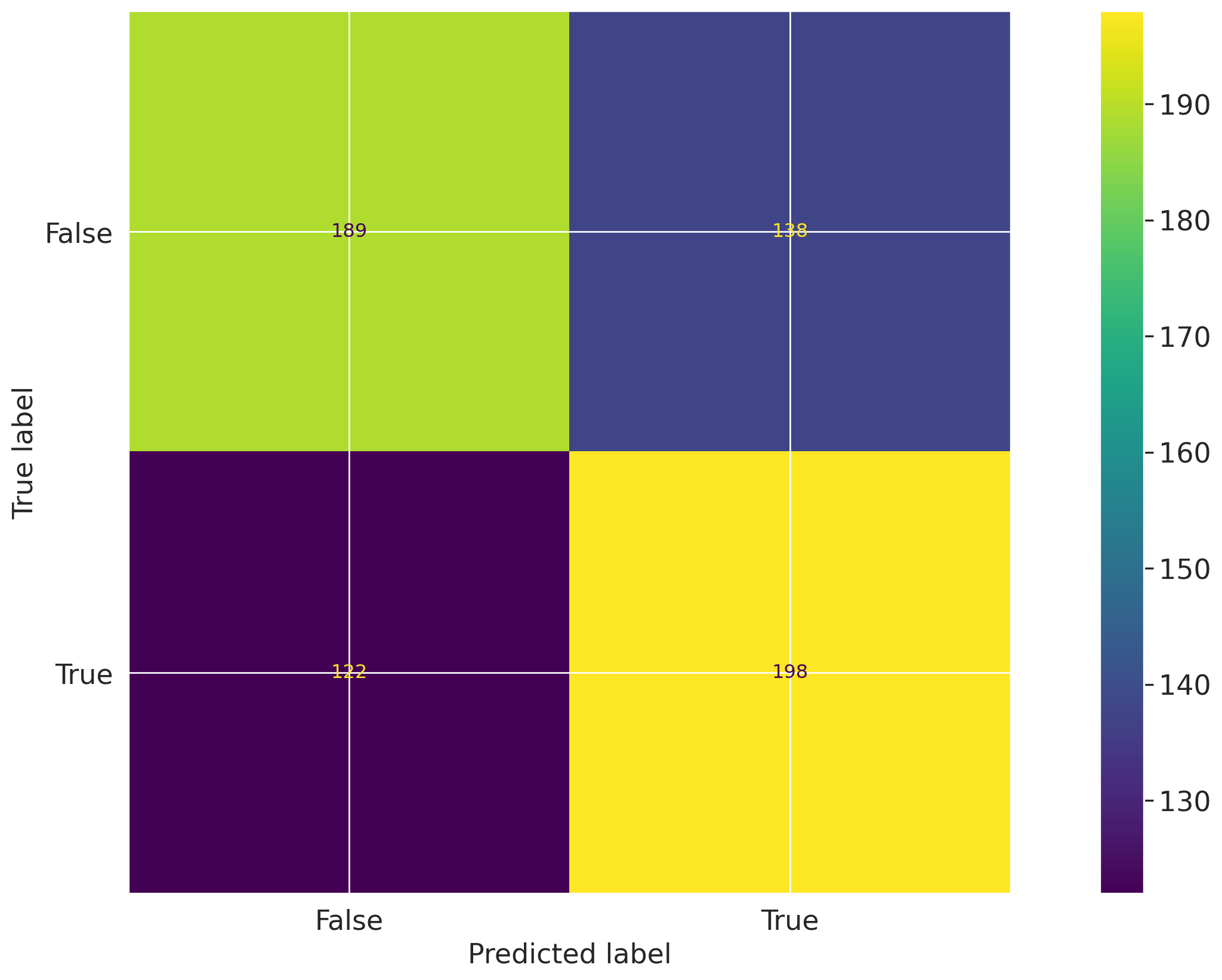
Let's first create a confusion matrix plot using the confusion_matrix function from the sklearn.metrics module:

import matplotlib.pyplot as plt
from sklearn import metrics

# Get the predicted classes
y_pred = log_reg.predict(vm_test_ds.x)

confusion_matrix = metrics.confusion_matrix(y_test, y_pred)

cm_display = metrics.ConfusionMatrixDisplay(
    confusion_matrix=confusion_matrix, display_labels=[False, True]
)
cm_display.plot()

Next, create a @vm.test wrapper that will allow you to create a reusable test. Note the following changes in the code below:

  • The function confusion_matrix takes two arguments dataset and model. This is a VMDataset and VMModel object respectively.
    • VMDataset objects allow you to access the dataset's true (target) values by accessing the .y attribute.
    • VMDataset objects allow you to access the predictions for a given model by accessing the .y_pred() method.
  • The function docstring provides a description of what the test does. This will be displayed along with the result in this notebook as well as in the ValidMind Platform.
  • The function body calculates the confusion matrix using the sklearn.metrics.confusion_matrix function as we just did above.
  • The function then returns the ConfusionMatrixDisplay.figure_ object — this is important as the ValidMind Library expects the output of the custom test to be a plot or a table.
  • The @vm.test decorator is doing the work of creating a wrapper around the function that will allow it to be run by the ValidMind Library. It also registers the test so it can be found by the ID my_custom_tests.ConfusionMatrix.
@vm.test("my_custom_tests.ConfusionMatrix")
def confusion_matrix(dataset, model):
    """The confusion matrix is a table that is often used to describe the performance of a classification model on a set of data for which the true values are known.

    The confusion matrix is a 2x2 table that contains 4 values:

    - True Positive (TP): the number of correct positive predictions
    - True Negative (TN): the number of correct negative predictions
    - False Positive (FP): the number of incorrect positive predictions
    - False Negative (FN): the number of incorrect negative predictions

    The confusion matrix can be used to assess the holistic performance of a classification model by showing the accuracy, precision, recall, and F1 score of the model on a single figure.
    """
    y_true = dataset.y
    y_pred = dataset.y_pred(model=model)

    confusion_matrix = metrics.confusion_matrix(y_true, y_pred)

    cm_display = metrics.ConfusionMatrixDisplay(
        confusion_matrix=confusion_matrix, display_labels=[False, True]
    )
    cm_display.plot()

    plt.close()  # close the plot to avoid displaying it

    return cm_display.figure_  # return the figure object itself

You can now run the newly created custom test on both the training and test datasets using the run_test() function:

# Training dataset
result = vm.tests.run_test(
    "my_custom_tests.ConfusionMatrix:training_dataset",
    inputs={"model": vm_model, "dataset": vm_train_ds},
)

Confusion Matrix Training Dataset

Confusion Matrix: Training Dataset is designed to evaluate the performance of a classification model by comparing its predictions against the true labels of a dataset. This test provides a detailed breakdown of the model's ability to correctly classify instances into their respective categories, offering insights into both the strengths and weaknesses of the model's predictive capabilities.

The test operates by constructing a 2x2 table known as the confusion matrix, which includes four key metrics: True Positive (TP), True Negative (TN), False Positive (FP), and False Negative (FN). These metrics are derived from comparing the predicted labels against the actual labels of the dataset. True Positives and True Negatives represent correct predictions, while False Positives and False Negatives indicate errors. The matrix allows for the calculation of various performance metrics such as accuracy, precision, recall, and F1 score. Accuracy measures the overall correctness of the model, precision indicates the proportion of positive identifications that were actually correct, recall measures the ability of the model to find all relevant cases, and the F1 score provides a balance between precision and recall. These metrics typically range from 0 to 1, where values closer to 1 indicate better performance.

The primary advantages of this test include its ability to provide a comprehensive view of a model's performance across different types of errors. By breaking down predictions into TP, TN, FP, and FN, the confusion matrix allows for a nuanced understanding of where a model excels and where it may need improvement. This is particularly useful in scenarios where the cost of false positives and false negatives is significant, such as in medical diagnosis or fraud detection. The test's ability to derive multiple performance metrics from a single matrix makes it a versatile tool for model evaluation, enabling stakeholders to make informed decisions based on a model's strengths and weaknesses.

It should be noted that the confusion matrix has limitations, particularly in its reliance on a balanced dataset for accurate interpretation. In cases of class imbalance, where one class significantly outnumbers the other, the matrix can give a misleading impression of model performance. Additionally, the confusion matrix does not account for the severity of different types of errors, which can vary depending on the application. Interpretation challenges also arise when comparing models with different thresholds or when the cost of errors is not uniform. These factors must be considered to avoid overestimating a model's effectiveness based solely on confusion matrix metrics.

This test shows a visual representation of the confusion matrix, with the predicted labels on the x-axis and the true labels on the y-axis. The matrix is color-coded, with darker colors indicating higher values. The key metrics displayed include True Positives (821), True Negatives (833), False Positives (456), and False Negatives (415). The color gradient provides a quick visual cue to the distribution of these values. The matrix allows for the calculation of accuracy, precision, recall, and F1 score, which are essential for understanding the model's performance. The scale of the values ranges from 0 to over 800, highlighting the distribution of correct and incorrect predictions. Notable observations include a relatively high number of false positives, which may indicate a tendency of the model to over-predict the positive class.

The test results reveal the following key insights:

  • High True Negative Rate: The model correctly identified 833 instances as negative, indicating strong performance in recognizing true negatives.
  • Significant False Positive Count: With 456 false positives, the model shows a tendency to incorrectly classify negatives as positives, which could impact precision.
  • Balanced True Positive and False Negative: The model has 821 true positives and 415 false negatives, suggesting a moderate recall rate and potential room for improvement in capturing all positive instances.

Based on these results, the model demonstrates a robust ability to correctly identify negative instances, as evidenced by the high true negative count. However, the significant number of false positives suggests that the model may benefit from adjustments to improve precision, particularly in applications where false positives carry a high cost. The balance between true positives and false negatives indicates a moderate recall, highlighting the need for potential enhancements to ensure all relevant cases are captured. These insights provide a clear understanding of the model's current performance and areas for potential refinement.

Figures

ValidMind Figure my_custom_tests.ConfusionMatrix:training_dataset:4d52
# Test dataset
result = vm.tests.run_test(
    "my_custom_tests.ConfusionMatrix:test_dataset",
    inputs={"model": vm_model, "dataset": vm_test_ds},
)

Confusion Matrix Test Dataset

Confusion Matrix: Test Dataset is designed to evaluate the performance of a classification model by comparing its predictions against the true values. This test provides a detailed breakdown of the model's ability to correctly classify instances into their respective categories, offering insights into both the strengths and weaknesses of the model's predictive capabilities.

The test operates by constructing a confusion matrix, which is a 2x2 table that categorizes predictions into four distinct outcomes: True Positive (TP), True Negative (TN), False Positive (FP), and False Negative (FN). True Positives and True Negatives represent correct predictions, where the model accurately identifies positive and negative instances, respectively. False Positives occur when the model incorrectly predicts a positive instance, while False Negatives arise from incorrect negative predictions. These outcomes are used to calculate key performance metrics such as accuracy, precision, recall, and F1 score. Accuracy measures the overall correctness of the model, precision indicates the proportion of true positive results in all positive predictions, recall assesses the model's ability to identify all relevant instances, and the F1 score provides a balance between precision and recall. These metrics typically range from 0 to 1, with higher values indicating better performance.

The primary advantages of this test include its ability to provide a comprehensive overview of a model's classification performance through a single, easily interpretable table. The confusion matrix allows for the identification of specific areas where the model excels or struggles, such as distinguishing between classes or handling imbalanced datasets. By breaking down predictions into true and false categories, the test facilitates a nuanced understanding of the model's behavior, enabling targeted improvements. Additionally, the derived metrics offer a standardized way to compare different models or configurations, making it a versatile tool for model evaluation across various domains.

It should be noted that the confusion matrix has limitations, particularly in its reliance on a binary classification framework, which may not fully capture the complexity of multi-class or multi-label problems. The test's effectiveness can be compromised by class imbalance, where the model may achieve high accuracy by favoring the majority class, leading to misleading interpretations. Furthermore, the metrics derived from the confusion matrix, such as precision and recall, can be sensitive to threshold settings, requiring careful consideration when interpreting results. The test also does not account for the cost of different types of errors, which may vary depending on the application context.

This test shows a visual representation of the confusion matrix, with the predicted labels on the x-axis and the true labels on the y-axis. The matrix is color-coded to indicate the frequency of each outcome, with darker colors representing higher counts. The key metrics displayed include True Positives (198), True Negatives (189), False Positives (118), and False Negatives (112). The color gradient provides an intuitive understanding of the distribution of predictions, highlighting areas where the model performs well or poorly. The scale ranges from 130 to 190, with notable concentrations in the True Positive and True Negative quadrants, suggesting a reasonable level of accuracy. However, the presence of False Positives and False Negatives indicates areas for potential improvement.

The test results reveal the following key insights:

  • High True Positive Rate: The model correctly identifies 198 positive instances, indicating strong performance in recognizing true positives.
  • Significant False Positive Count: With 118 false positives, the model shows a tendency to incorrectly classify negative instances as positive, which may affect precision.
  • Balanced True Negative Rate: The model achieves 189 true negatives, reflecting its ability to accurately identify negative instances.
  • Notable False Negative Presence: The occurrence of 112 false negatives suggests challenges in capturing all positive instances, impacting recall.

Based on these results, the model demonstrates a solid ability to correctly classify both positive and negative instances, as evidenced by the high counts of true positives and true negatives. However, the presence of a significant number of false positives and false negatives indicates areas where the model's precision and recall could be improved. These insights suggest that while the model performs well overall, adjustments may be needed to enhance its ability to distinguish between classes more accurately, particularly in reducing false positives and false negatives. This balanced analysis provides a clear understanding of the model's current performance and potential areas for refinement.

Figures

ValidMind Figure my_custom_tests.ConfusionMatrix:test_dataset:f5ff

Add parameters to custom tests

Custom tests can take parameters just like any other function. To demonstrate, let's modify the confusion_matrix function to take an additional parameter normalize that will allow you to normalize the confusion matrix:

@vm.test("my_custom_tests.ConfusionMatrix")
def confusion_matrix(dataset, model, normalize=False):
    """The confusion matrix is a table that is often used to describe the performance of a classification model on a set of data for which the true values are known.

    The confusion matrix is a 2x2 table that contains 4 values:

    - True Positive (TP): the number of correct positive predictions
    - True Negative (TN): the number of correct negative predictions
    - False Positive (FP): the number of incorrect positive predictions
    - False Negative (FN): the number of incorrect negative predictions

    The confusion matrix can be used to assess the holistic performance of a classification model by showing the accuracy, precision, recall, and F1 score of the model on a single figure.
    """
    y_true = dataset.y
    y_pred = dataset.y_pred(model=model)

    if normalize:
        confusion_matrix = metrics.confusion_matrix(y_true, y_pred, normalize="all")
    else:
        confusion_matrix = metrics.confusion_matrix(y_true, y_pred)

    cm_display = metrics.ConfusionMatrixDisplay(
        confusion_matrix=confusion_matrix, display_labels=[False, True]
    )
    cm_display.plot()

    plt.close()  # close the plot to avoid displaying it

    return cm_display.figure_  # return the figure object itself

Pass parameters to custom tests

You can pass parameters to custom tests by providing a dictionary of parameters to the run_test() function.

  • The parameters will override any default parameters set in the custom test definition. Note that dataset and model are still passed as inputs.
  • Since these are VMDataset or VMModel inputs, they have a special meaning.
  • When declaring a dataset, model, datasets or models argument in a custom test function, the ValidMind Library will expect these get passed as inputs to run_test() or run_documentation_tests().

Re-running the confusion matrix with normalize=True and our testing dataset looks like this:

# Test dataset with normalize=True
result = vm.tests.run_test(
    "my_custom_tests.ConfusionMatrix:test_dataset_normalized",
    inputs={"model": vm_model, "dataset": vm_test_ds},
    params={"normalize": True}
)

Confusion Matrix Test Dataset Normalized

Confusion Matrix Test Dataset Normalized is designed to evaluate the performance of a classification model by providing a detailed breakdown of its predictions against known true values. This test uses a confusion matrix, a 2x2 table, to display the number of true positives, true negatives, false positives, and false negatives. By normalizing these values, the test offers a proportionate view of the model's performance, allowing for a more intuitive understanding of its accuracy, precision, recall, and F1 score.

The test operates by calculating the confusion matrix, which involves comparing the predicted labels of a classification model against the actual labels in a dataset. The matrix is composed of four key metrics: true positives (correct positive predictions), true negatives (correct negative predictions), false positives (incorrect positive predictions), and false negatives (incorrect negative predictions). Normalization is applied to these values, converting them into proportions of the total number of predictions, which typically range from 0 to 1. This approach allows for a more balanced comparison across different datasets or models, as it accounts for class imbalances and provides a clearer picture of the model's predictive capabilities.

The primary advantages of this test include its ability to provide a comprehensive overview of a model's classification performance through a single, easily interpretable visualization. By normalizing the confusion matrix, the test mitigates the impact of class imbalances, making it particularly useful for datasets where one class may dominate. This normalization allows stakeholders to assess the model's performance in a more equitable manner, facilitating comparisons across different models or datasets. Additionally, the test's output can be used to derive key performance metrics such as precision, recall, and F1 score, which are critical for understanding the model's strengths and weaknesses in various scenarios.

It should be noted that while the confusion matrix provides valuable insights into a model's performance, it has limitations. The test does not account for the costs associated with different types of errors, such as false positives or false negatives, which can vary significantly depending on the application. Additionally, the normalization process, while useful for comparison, may obscure the absolute number of errors, which could be important in certain contexts. Interpretation challenges may arise if the matrix is used in isolation without considering other performance metrics or domain-specific factors. Furthermore, the test assumes that the dataset is representative of the real-world scenario, which may not always be the case.

This test shows a normalized confusion matrix presented as a color-coded plot, where each cell represents the proportion of predictions falling into the categories of true positive, true negative, false positive, and false negative. The x-axis denotes the predicted labels, while the y-axis represents the true labels. The color gradient, ranging from dark to light, indicates the proportion of predictions, with specific values annotated within each cell. The matrix reveals that the model has a true positive rate of 0.31 and a true negative rate of 0.29, indicating the proportions of correct predictions for each class. The false positive rate is 0.21, and the false negative rate is 0.19, highlighting the model's tendency to misclassify certain instances. The color bar on the right provides a reference for interpreting the color intensity in terms of prediction proportions.

The test results reveal the following key insights:

  • Balanced True Positive and True Negative Rates: The model demonstrates a true positive rate of 0.31 and a true negative rate of 0.29, indicating a relatively balanced performance across both classes.
  • Higher False Positive Rate: The false positive rate of 0.21 suggests that the model is more prone to incorrectly predicting positive instances compared to false negatives.
  • Moderate False Negative Rate: With a false negative rate of 0.19, the model shows a moderate level of incorrect negative predictions, which may impact recall.

Based on these results, the model exhibits a balanced performance in terms of true positive and true negative predictions, with a slight inclination towards false positives. This behavior suggests that while the model is effective in identifying true instances, it may require further tuning to reduce the rate of false positives, which could be critical in applications where such errors carry significant consequences. The normalized confusion matrix provides a clear visualization of these dynamics, offering a valuable tool for stakeholders to assess and refine the model's predictive capabilities in alignment with specific business objectives or operational requirements.

Parameters:

{
  "normalize": true
}
            

Figures

ValidMind Figure my_custom_tests.ConfusionMatrix:test_dataset_normalized:df6b

Log the confusion matrix results

As we learned in 2 — Start the model development process under Documenting results > Run and log an individual tests, you can log any result to the ValidMind Platform with the .log() method of the result object, allowing you to then add the result to the documentation.

You can now do the same for the confusion matrix results:

result.log()
2025-12-31 22:12:45,808 - INFO(validmind.vm_models.result.result): Test driven block with result_id my_custom_tests.ConfusionMatrix:test_dataset_normalized does not exist in model's document
Note the output returned indicating that a test-driven block doesn't currently exist in your model's documentation for this particular test ID.

That's expected, as when we run individual tests the results logged need to be manually added to your documentation within the ValidMind Platform.

Using external test providers

Creating inline custom tests with a function is a great way to customize your model documentation. However, sometimes you may want to reuse the same set of tests across multiple models and share them with others in your organization. In this case, you can create an external custom test provider that will allow you to load custom tests from a local folder or a Git repository.

In this section you will learn how to declare a local filesystem test provider that allows loading tests from a local folder following these high level steps:

  1. Create a folder of custom tests from existing inline tests (tests that exist in your active Jupyter Notebook)
  2. Save an inline test to a file
  3. Define and register a LocalTestProvider that points to that folder
  4. Run test provider tests
  5. Add the test results to your documentation

Create custom tests folder

Let's start by creating a new folder that will contain reusable custom tests from your existing inline tests.

The following code snippet will create a new my_tests directory in the current working directory if it doesn't exist:

tests_folder = "my_tests"

import os

# create tests folder
os.makedirs(tests_folder, exist_ok=True)

# remove existing tests
for f in os.listdir(tests_folder):
    # remove files and pycache
    if f.endswith(".py") or f == "__pycache__":
        os.system(f"rm -rf {tests_folder}/{f}")

After running the command above, confirm that a new my_tests directory was created successfully. For example:

~/notebooks/tutorials/model_development/my_tests/

Save an inline test

The @vm.test decorator we used in Implementing a custom inline test above to register one-off custom tests also includes a convenience method on the function object that allows you to simply call <func_name>.save() to save the test to a Python file at a specified path.

While save() will get you started by creating the file and saving the function code with the correct name, it won't automatically include any imports, or other functions or variables, outside of the functions that are needed for the test to run. To solve this, pass in an optional imports argument ensuring necessary imports are added to the file.

The confusion_matrix test requires the following additional imports:

import matplotlib.pyplot as plt
from sklearn import metrics

Let's pass these imports to the save() method to ensure they are included in the file with the following command:

confusion_matrix.save(
    # Save it to the custom tests folder we created
    tests_folder,
    imports=["import matplotlib.pyplot as plt", "from sklearn import metrics"],
)
2025-12-31 22:12:46,343 - INFO(validmind.tests.decorator): Saved to /home/runner/work/documentation/documentation/site/notebooks/EXECUTED/model_development/my_tests/ConfusionMatrix.py!Be sure to add any necessary imports to the top of the file.
2025-12-31 22:12:46,344 - INFO(validmind.tests.decorator): This metric can be run with the ID: <test_provider_namespace>.ConfusionMatrix
  • # Saved from __main__.confusion_matrix
    # Original Test ID: my_custom_tests.ConfusionMatrix
    # New Test ID: <test_provider_namespace>.ConfusionMatrix
  • def ConfusionMatrix(dataset, model, normalize=False):

Register a local test provider

Now that your my_tests folder has a sample custom test, let's initialize a test provider that will tell the ValidMind Library where to find your custom tests:

  • ValidMind offers out-of-the-box test providers for local tests (tests in a folder) or a Github provider for tests in a Github repository.
  • You can also create your own test provider by creating a class that has a load_test method that takes a test ID and returns the test function matching that ID.
Want to learn more about test providers?

An extended introduction to test providers can be found in: Integrate external test providers

Initialize a local test provider

For most use cases, using a LocalTestProvider that allows you to load custom tests from a designated directory should be sufficient.

The most important attribute for a test provider is its namespace. This is a string that will be used to prefix test IDs in model documentation. This allows you to have multiple test providers with tests that can even share the same ID, but are distinguished by their namespace.

Let's go ahead and load the custom tests from our my_tests directory:

from validmind.tests import LocalTestProvider

# initialize the test provider with the tests folder we created earlier
my_test_provider = LocalTestProvider(tests_folder)

vm.tests.register_test_provider(
    namespace="my_test_provider",
    test_provider=my_test_provider,
)
# `my_test_provider.load_test()` will be called for any test ID that starts with `my_test_provider`
# e.g. `my_test_provider.ConfusionMatrix` will look for a function named `ConfusionMatrix` in `my_tests/ConfusionMatrix.py` file

Run test provider tests

Now that we've set up the test provider, we can run any test that's located in the tests folder by using the run_test() method as with any other test:

  • For tests that reside in a test provider directory, the test ID will be the namespace specified when registering the provider, followed by the path to the test file relative to the tests folder.
  • For example, the Confusion Matrix test we created earlier will have the test ID my_test_provider.ConfusionMatrix. You could organize the tests in subfolders, say classification and regression, and the test ID for the Confusion Matrix test would then be my_test_provider.classification.ConfusionMatrix.

Let's go ahead and re-run the confusion matrix test with our testing dataset by using the test ID my_test_provider.ConfusionMatrix. This should load the test from the test provider and run it as before.

result = vm.tests.run_test(
    "my_test_provider.ConfusionMatrix",
    inputs={"model": vm_model, "dataset": vm_test_ds},
    params={"normalize": True},
)

result.log()

Confusion Matrix

Confusion Matrix is designed to evaluate the performance of a classification model by comparing predicted and actual outcomes. It provides a detailed breakdown of correct and incorrect predictions, allowing for a comprehensive assessment of the model's accuracy and error types.

The test operates by constructing a 2x2 table that categorizes predictions into four types: True Positives (TP), True Negatives (TN), False Positives (FP), and False Negatives (FN). These categories help in calculating key performance metrics such as accuracy, precision, recall, and F1 score. Accuracy measures the overall correctness of the model, while precision and recall focus on the model's ability to correctly identify positive instances. The F1 score provides a balance between precision and recall. The confusion matrix is particularly useful for understanding the types of errors the model makes and is often normalized to show proportions, making it easier to interpret across different datasets.

The primary advantages of this test include its ability to provide a clear and concise summary of a model's performance across multiple dimensions. By breaking down predictions into TP, TN, FP, and FN, it allows for a nuanced understanding of where a model excels or struggles. This is particularly beneficial in scenarios where the cost of false positives and false negatives is significant, such as in medical diagnoses or fraud detection. The confusion matrix's ability to be normalized also aids in comparing models across different datasets or class distributions, making it a versatile tool in model evaluation.

It should be noted that the confusion matrix has limitations, particularly in its reliance on binary classification. For multi-class problems, the matrix becomes more complex and harder to interpret. Additionally, it does not provide insights into the reasons behind the model's errors, nor does it account for the severity of different types of errors. The matrix also assumes that the classes are equally important, which may not be the case in all applications. Care must be taken in interpreting the results, especially in imbalanced datasets where accuracy can be misleading.

This test shows a normalized confusion matrix plot, where the values represent the proportion of predictions in each category. The matrix is divided into four quadrants, with the top left representing true negatives (0.29), the top right false positives (0.21), the bottom left false negatives (0.19), and the bottom right true positives (0.31). The color gradient from dark to light indicates the proportion, with lighter colors representing higher values. The normalization allows for easy comparison of the model's performance across different classes, highlighting areas where the model performs well or poorly.

The test results reveal the following key insights:

  • Balanced True Positives and Negatives: The model shows a relatively balanced performance with true positives at 0.31 and true negatives at 0.29, indicating a fair ability to correctly classify both positive and negative instances.
  • Moderate False Positives and Negatives: False positives and false negatives are at 0.21 and 0.19, respectively, suggesting areas for improvement in reducing incorrect classifications.

Based on these results, the model demonstrates a balanced performance in classifying both positive and negative instances, with a slight edge in true positive identification. The presence of moderate false positives and negatives indicates potential areas for refinement, particularly in enhancing the model's precision and recall. The normalized confusion matrix provides a clear visual representation of the model's strengths and weaknesses, guiding further optimization efforts.

Parameters:

{
  "normalize": true
}
            

Figures

ValidMind Figure my_test_provider.ConfusionMatrix:de06
2025-12-31 22:13:01,767 - INFO(validmind.vm_models.result.result): Test driven block with result_id my_test_provider.ConfusionMatrix does not exist in model's document
Again, note the output returned indicating that a test-driven block doesn't currently exist in your model's documentation for this particular test ID.

That's expected, as when we run individual tests the results logged need to be manually added to your documentation within the ValidMind Platform.

Add test results to documentation

With our custom tests run and results logged to the ValidMind Platform, let's head to the model we connected to at the beginning of this notebook and insert our test results into the documentation (Need more help?):

  1. From the Inventory in the ValidMind Platform, go to the model you connected to earlier.

  2. In the left sidebar that appears for your model, click Documentation under Documents.

  3. Locate the Data Preparation section and click on 3.2. Model Evaluation to expand that section.

  4. Hover under the Pearson Correlation Matrix content block until a horizontal dashed line with a + button appears, indicating that you can insert a new block.

    Screenshot showing insert block button in model documentation

  5. Click + and then select Test-Driven Block under FROM LIBRARY:

    • Click on Custom under TEST-DRIVEN in the left sidebar.
    • Select the two custom ConfusionMatrix tests you logged above:

    Screenshot showing the ConfusionMatrix tests selected

  6. Finally, click Insert 2 Test Results to Document to add the test results to the documentation.

    Confirm that the two individual results for the confusion matrix tests have been correctly inserted into section 3.2. Model Evaluation of the documentation.

In summary

In this third notebook, you learned how to:

Next steps

Finalize testing and documentation

Now that you're proficient at using the ValidMind Library to run and log tests, let's put the last pieces in place to prepare our fully documented sample model for review: 4 — Finalize testing and documentation